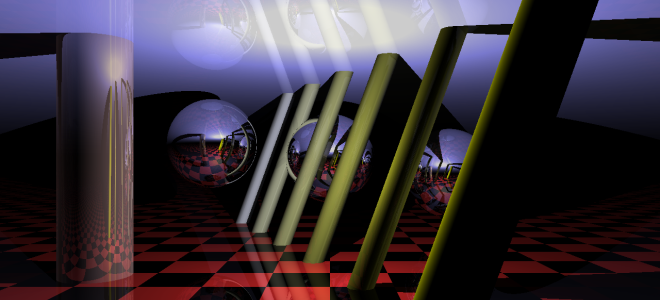
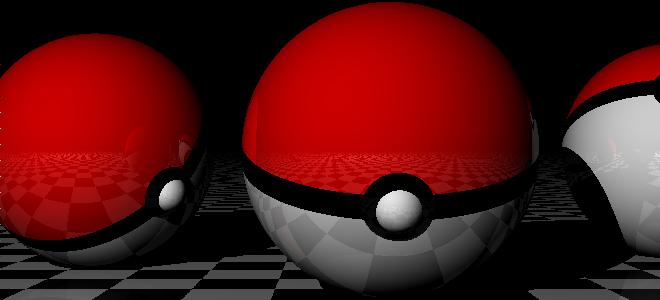
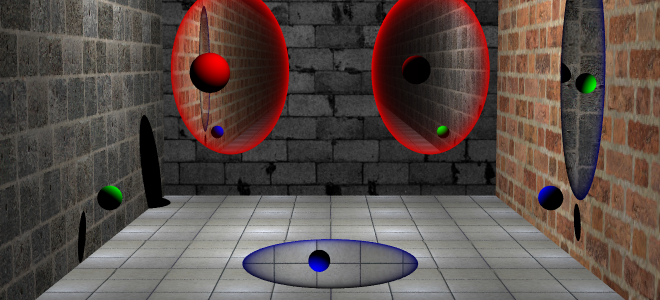
Here is a report of the Ray Tracer written by myself Christopher Chedeau. I've taken the file format and most of the examples from the Ray Tracer of our friends Maxime Mouial and Clรฉment Bล“sch. The source is available on Github.

It is powered by Open Source technologies: glMatrix, CodeMirror, CoffeeScript, Twitter Bootstrap, jQuery and Web Workers.

Check out the demo, or click on any of the images.

Objects

Our Ray Tracer supports 4 object types: Plane, Sphere, Cylinder and Cone.
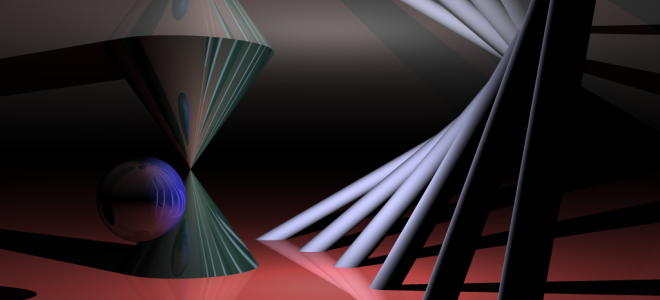
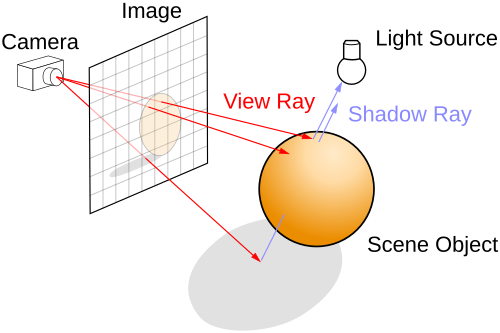
The core idea of the Ray Tracer is to send rays that will be reflected on items. Given a ray (origin and direction), we need to know if it intersect an object on the scene, and if it does, how to get a ray' that will be reflected on the object.

Knowing that, we open up our high school math book and come up with all the following formulas.

Legend: Ray Origin \(O\), Ray Direction \(D\), Intersection Position \(O'\), Intersection Normal \(N\) and Item Radius \(r\).

Intersection Normal
Plane \[t = \frac{O_z}{D_z}\] \[
N = \left\{
\begin{array}{l}
x = 0 \\
y = 0 \\
z = -sign(D_z)
\end{array} \right.
\]
Sphere \[
\begin{array}{l l l}
& t^2 & (O \cdot O) \\
+ & 2t & (O \cdot D) \\
+ & & (O \cdot O) - r^2
\end{array}
= 0\]
\[
N = \left\{
\begin{array}{l}
x = O'_x \\
y = O'_y \\
z = O'_z
\end{array} \right.
\]
Cylinder \[
\begin{array}{l l l}
& t^2 & (D_x D_x + D_y D_y) \\
+ & 2t & (O_x D_x + O_y D_y) \\
+ & & (O_x O_x + O_y O_y - r^2)
\end{array}
= 0\]
\[
N = \left\{
\begin{array}{l}
x = O'_x \\
y = O'_y \\
z = 0
\end{array} \right.
\]
Cone \[
\begin{array}{l l l}
& t^2 & (D_x D_x + D_y D_y - r^2 D_z D_z) \\
+ & 2t & (O_x D_x + O_y D_y - r^2 O_z D_z) \\
+ & & (O_x O_x + O_y O_y - r^2 O_z O_z)
\end{array}
= 0\]
\[
N = \left\{
\begin{array}{l}
x = O'_x \\
y = O'_y \\
z = - O'_z * tan(r^2)
\end{array} \right.
\]

In order to solve the equation \(at^2 + bt + c = 0\), we use
\[\Delta = b^2 - 4ac \]\[
\begin{array}{c c c}
\Delta \geq 0 & t_1 = \frac{-b - \sqrt{\Delta}}{2a} & t_2 = \frac{-b + \sqrt{\Delta}}{2a}
\end{array}
\]

And here is the formula for the reflected ray:

\[
\left\{
\begin{array}{l}
O' = O + tD + \varepsilon D' \\
D' = D - 2 (D \cdot N) * N
\end{array}
\right.
\]

In order to fight numerical precision errors, we are going to move the origin of the reflected point a little bit in the direction of the reflected ray (\(\varepsilon D'\)). It will avoid to falsely detect a collision with the current object.

Coordinates, Groups and Rotations

We want to move and rotate objects. In order to do that, we compute a transformation matrix (and it's inverse) for each object in the scene using the following code:

\[
T = \begin{array}{l}
(Identity * Translate_g * RotateX_g * RotateY_g * RotateZ_g) * \\
(Identity * Translate_i * RotateX_i * RotateY_i * RotateZ_i)
\end{array}
\]\[ I = T^{-1} \]

\[Translate(x, y, z) = \left(\begin{array}{c c c c}
1 & 0 & 0 & x \\
0 & 1 & 0 & y \\
0 & 0 & 1 & z \\
0 & 0 & 0 & 1
\end{array}\right)\]
\[RotateX(\alpha) = \left(\begin{array}{c c c c}
1 & 0 & 0 & 0 \\
0 & cos(\alpha) & -sin(\alpha) & 0 \\
0 & sin(\alpha) & cos(\alpha) & 0 \\
0 & 0 & 0 & 1
\end{array}\right)\]
\[RotateY(\alpha) = \left(\begin{array}{c c c c}
cos(\alpha) & 0 & sin(\alpha) & 0 \\
0 & 1 & 0 & 0 \\
-sin(\alpha) & 0 & cos(\alpha) & 0 \\
0 & 0 & 0 & 1
\end{array}\right)\]
\[RotateZ(\alpha) = \left(\begin{array}{c c c c}
cos(\alpha) & -sin(\alpha) & 0 & 0 \\
sin(\alpha) & cos(\alpha) & 0 & 0 \\
0 & 0 & 1 & 0 \\
0 & 0 & 0 & 1
\end{array}\right)\]

We have written the intersection and normal calculations in the object's coordinate system instead of the world's coordinate system. It makes them easier to write. We use the transformation matrix to do object -> world and the inverse matrix to do world -> object.

\[
\left\{\begin{array}{l}
O_{world} = T * O_{object} \\
D_{world} = (T * D_{object}) - (T * 0_4)
\end{array}\right.
\]
\[
\left\{\begin{array}{l}
O_{object} = I * O_{world} \\
D_{object} = (I * D_{world}) - (I * 0_4)
\end{array}\right.
\]
\[0_4 = \left(\begin{array}{c} 0 \\
0 \\
0 \\
1
\end{array}\right)
\]


Bounding Box

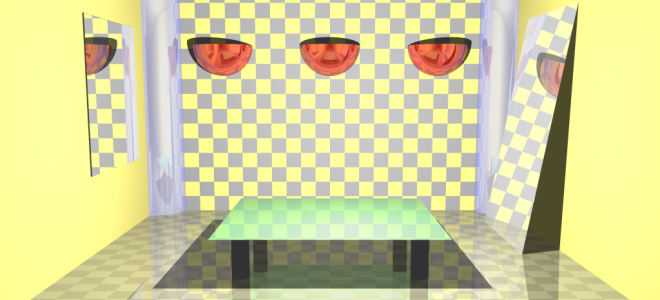
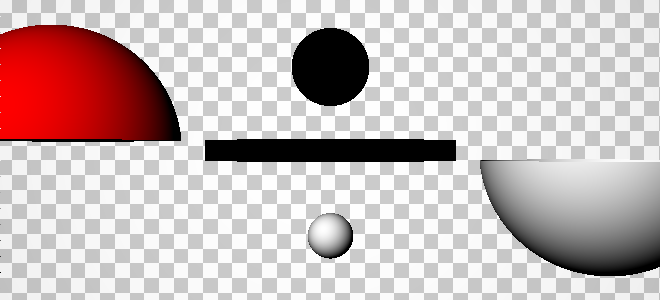
The previous equations give us objects with infinite dimensions (except for the sphere) whereas objects in real life have finite dimensions. To simulate this, it is possible to provide two points that will form a bounding box around the object. On the intersection test, we are going to use the nearest point that is inside the bounding box.

This gives us the ability to do various objects such as mirrors, table surface and legs, light bubbles and even a Pokeball!
Light

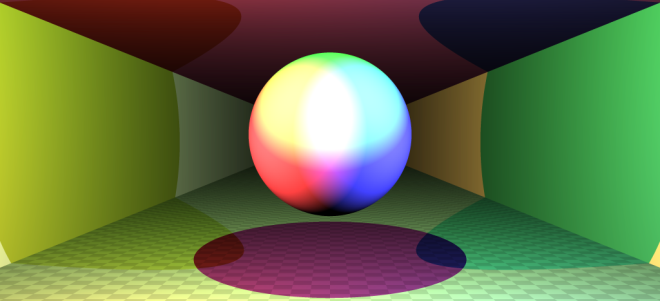
An object is composed of an Intensity \(I_o\), a Color \(C_o\) and a Brightness \(B_o\). Each light has a Color \(C_l\) and there is an ambient color \(C_a\). Using all those properties, we can calculate the color of a point using the following formula:

\[
I_o * (C_o + B_o) * \left(C_a + \sum_{l}{(N \cdot D) * C_l}\right)
\]

Only the lights visible from the intersection point are used in the sum. In order to check this, we send a shadow ray from the intersection point to the light and see if it intersects any object.
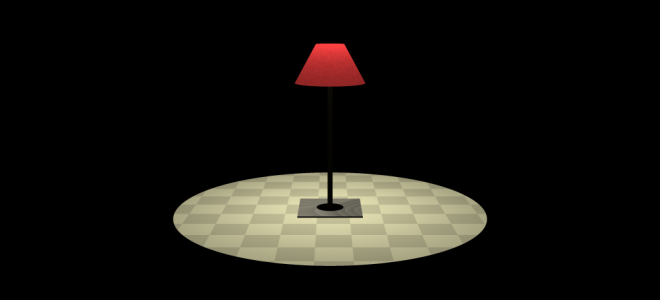
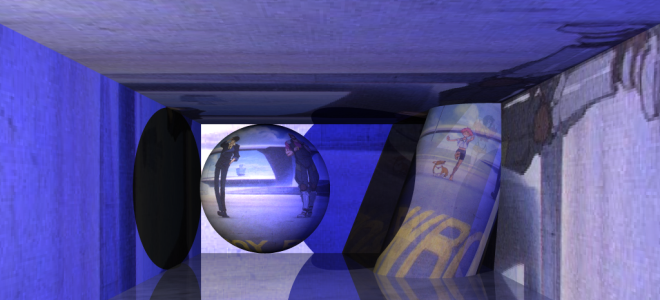
The following images are examples to demonstrate the lights.
Textures

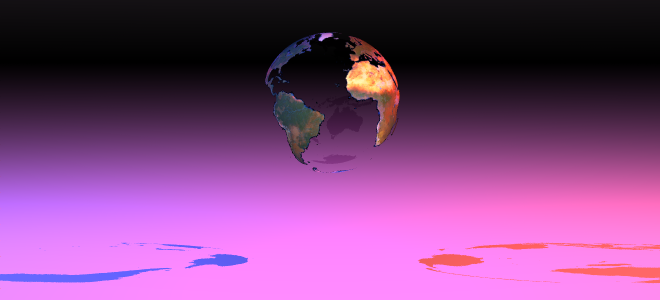
In order to put a texture on an object, we need to map a point \((x, y, z)\) in the object's coordinate system into a point \((x, y)\) in the texture's coordinate system. For planes, it is straightforward, we just the \(z\) coordinate (which is equal to zero anyway). For spheres, cylinders and cones it is a bit more involved. Here is the formula where \(w\) and \(h\) are the width and height of the texture.

\[
\begin{array}{c c}
\phi = acos(\frac{O'_y}{r}) & \theta = \frac{acos\left(\frac{O'_x}{r * sin(\phi)}\right)}{2\pi}
\end{array}
\]\[
\begin{array}{c c}
x = w * \left\{\begin{array}{l l} \theta & \text{if } O'_x < 0 \\ 1 - \theta & \text{else}\end{array}\right. & y = h * \frac{\phi}{\pi} \end{array} \] Once we have the texture coordinates, we can easily create a checkerboard or put a texture. We added options such as scaling and repeat in order to control how the texture is placed.
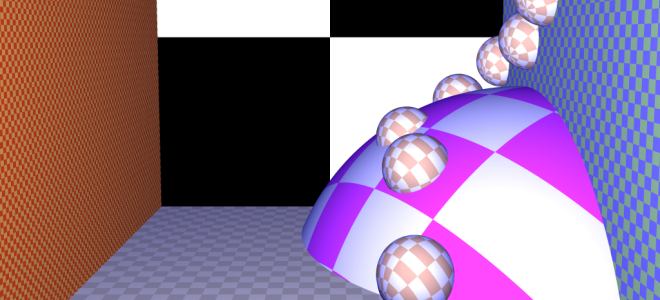
We also support the alpha mask in order to make a color from a texture transparent.
Progressive Rendering

Ray tracing is a slow technique. At first, I generated pixels line by line, but I found out that the first few lines do not hold much information.

Instead, what we want to do is to have a fast overview of the scene and then improve on the details. In order to do that, during the first iteration we are only generating 1 pixel for a 32x32 square. Then we generate 1 pixel for a 16x16 square and so on ... We generate the top-left pixel and fill all the unknown pixels with it.
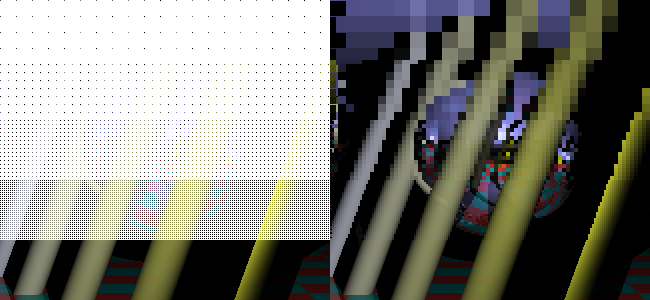
In order not to regenerate pixels we already seen, I came up with a condition to know if a pixel has already been generated. \(size\) is the current square size (32, 16, ...).

\[\left\{\begin{array}{l}
x \equiv 0 \pmod{size * 2}\\
y \equiv 0 \pmod{size * 2}
\end{array}\right.
\]

Supersampling

Aliasing is a problem with Ray Tracing and we solve this issue using supersampling. Basically, we send more than one ray for each pixel. We have to chose representative points from a square. There are multiple strategies: in the middle, in a grid or random. Check the result of various combinations in the following image:

Perlin Noise

We can generate random textures using Perlin Noise. We can control several parameters such as \(octaves\), the number of basic noise, the initial scale \(f\) and the factor of contribution \(p\) of the high frequency noises.

\[ noise(x, y, z) = \sum_{i = 0}^{octaves}{p^i * PerlinNoise(\frac{2^i}{f}x, \frac{2^i}{f}y, \frac{2^i}{f}z)} \]
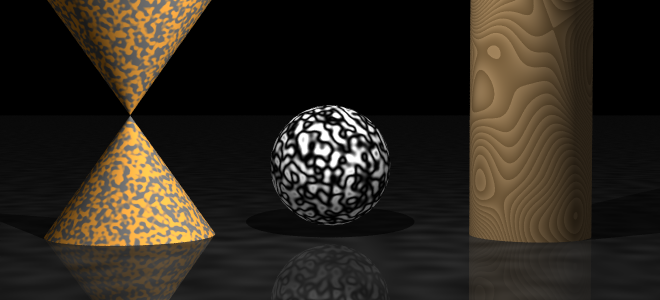
\[noise\] \[noise * 20 - \lfloor noise * 20 \rfloor\] \[\frac{cos(noise) + 1}{2}\]

As seen in the example, we can apply additional functions after the noise has been generated to make interesting effects.

Portal

Last but not least, Portals from the self-titled game. They are easy to reproduce in a Ray Tracer and yet, I haven't seen any done.

If a ray enters portal A, it will go out from portal B. It is trivial to implement it, it is just a coordinates system transformation. Like we did for world and object transformation, we do it between A and B using their transformation matrix.

\[
\left\{\begin{array}{l}
O_{a}' = T * O_{b} \\
D_{a}' = (T * D_{b}) - (T * 0_4)
\end{array}\right.
\]
\[
\left\{\begin{array}{l}
O_{b}' = T * O_{a} \\
D_{b}' = (T * D_{a}) - (T * 0_4)
\end{array}\right.
\]

Scene Editor

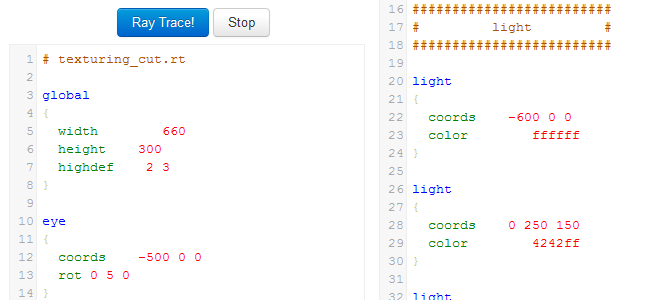
In order to create scenes more easily, we have defined a scene description language. We developed a basic CodeMirror syntax highlighting script. Just enter write your scene down and press Ray Trace ๐Ÿ™‚

I've been working on code that works on Browser, Web Workers and NodeJS. In order to export my module, I've been writing ugly code like this one:

(function () {
  /* ... Code that defines MyModule ... */
 
  var all;
  if (typeof self !== 'undefined') {
    all = self; // Web Worker
  } else if (typeof window !== 'undefined') {
    all = window; // Browser
  } else if (typeof global !== 'undefined') {
    all = global; // NodeJS
  }
  all.MyModule = MyModule;
 
  if (typeof module !== 'undefined') {
    module.exports = MyModule;
  }
})();

One-line Solution

Guillaume Marty showed me that sink.js uses this as a replacement for self, window and global. I managed to add support for module.exports in a one-liner!

(function (global) {
  /* ... Code that defines MyModule ... */
 
  global.MyModule = (global.module || {}).exports = MyModule;
})(this);

I have been looking for this magic line for a long time, I hope it will be useful to you too ๐Ÿ™‚

On MMO-Champion, we often paste World of Warcraft patch notes taken from Blizzard. The main problem is that it's plain text. We want to be able to add links to all the spells, quests, zones ... This way people can mouseover and see the description. It helps figuring out what changed.

We create a Trie that contains item/spell/... names as key and url as value. For each letter of the text, we search the longest string in the trie that matches this part of the text. If found, we link it and move right after the end of the name, else we advance by one character.

Specialized Rules

The algorithm above works well but there are many little problems that arise. In order to solve them, we apply several specialized rules.

  • There are names that have more than one link. We proritize the source (Ability > Item > Quest > ...) and sort them by descending id.
  • All the interesting names start by a capital letter. This removes a lot of noise but keeps the first word of sentences.
  • Stamina, Gladiator, Buff, Stat. There are many common words that are spells, we have a blacklist to remove them.
  • [Heal]ing. If the name found ends in the middle of a word, we discard it.
  • [Cinderweb Spiderling]s. But there's an exception, if there is only an s after.
  • [Fireball] Barrage. If the next word is capitalized, it means the name is wrong.
  • [Sanctuary] of Malorne. We also discard if the next word is of.

Example

Druid

  • Druids now gain 1 attack power per point of Strength, down from 2. They continue to gain 2 attack power per point of Agility while in Cat Form or Bear Form. In addition, Cat Form's scaling rate from gear upgrades was slower than other classes, which was causing them to fall behind in damage with higher item levels. To counter the Strength change and improve scaling, the following changes have been made. All numbers cited are for level-85 druids.
  • Ferocious Bite damage has been increased by 15%. In addition, its base cost has been reduced to 25 energy and it can use up to 25 energy, for up to a 100% damage increase.
  • Mangle (Cat) damage at level 80 and above has been increased to 540% weapon damage, up from 460%, and bonus damage has been lowered to 302.
  • Rake initial damage on hit now deals the same damage as each periodic tick (and is treated the same for all combat calculations). Periodic damage now gains 14.7% of attack power per tick, up from 12.6%, and base damage per tick has been lowered from 557 to 56. There is a known issue with Rake's tooltip being incorrect from this change will be corrected in a future patch.
  • Ravage damage at level 80 and above has been increased to 950% weapon damage, up from 850%, and bonus damage has been lowered to 532.
  • Savage Roar now grants 80% increased damage to melee auto attacks, up from 50%. The Glyph of Savage Roar remains an unchanged bonus of 5% to that total.
  • Shred damage at level 80 and above has been increased to 540% weapon damage, up from 450%, and bonus damage has been lowered to 302.
  • Entangling Roots and the equivalent spell triggered by Nature's Grasp no longer deal damage.
  • Innervate now grants an ally target 5% of his or her maximum mana over 10 seconds, but still grants 20% of the druid's maximum mana over 10 seconds when self-cast.
  • Omen of Clarity clearcasting buff from now lasts 15 seconds, up from 8 seconds.
  • Starfire damage has been increased by approximately 23%.
  • Swipe (Cat) now deals 600% weapon damage at level 80 or higher, down from 670%.
  • Wrath damage has been increased by approximately 23%.

Rest of the example ...

Conclusion

It takes around a minute to generate the trie, which needs to be done once per big patch. Then it takes less than a second to process a full patch note, automatically adding around 700 links.

The script does not generate a perfect output and needs to be reviewed by a human. However, it takes an order of magnitude less time to improve the generated result than doing it from scratch.

For a school project, I had to make a part of a spell-check program. Given a dictionnary of words, you have to determine all the words that are within K mistakes of the original word.

Trie

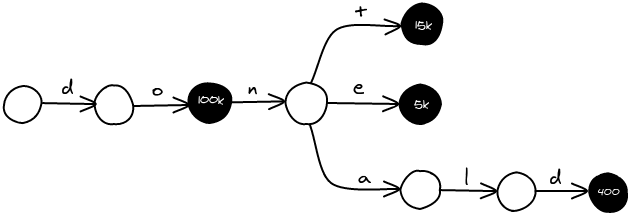
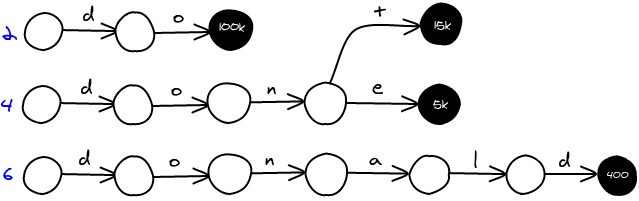
As input, we've got a list of words along with their frequency. For example, with the following list, we are going to build a trie.

do     100 000
dont    15 000
done     5 000
donald     400

In order to minimize the memory footprint, I've made a node structure that fits into 32 bits.

struct {
	unsigned short is_link : 1;
	unsigned short is_last_child : 1;
	union content {
		struct {
			unsigned short letter : 6; // 2^6  = 64 different charaters
			unsigned int next : 24;    // 2^24 = 16 777 216 nodes
		} link;
		struct {
			unsigned short is_overflow : 1;
			unsigned int freq : 29;    // 2^29 = 536 870 912
		} final;
	}
} node;

The frequence can be greater than 2^30. We're going to store values between 0 and 2^29 directly inside the node, and if it doesn't fit, we are going to retrieve the value in a separate memory location and store its corresponding id.

Damerau Levenshtein Distance

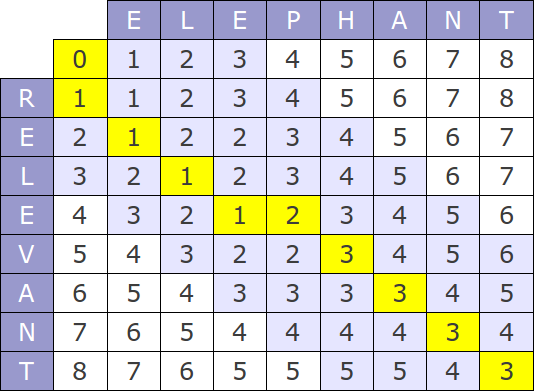
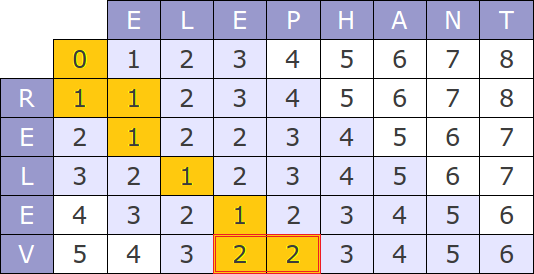
The distance between two words we use is Damerau Levenshtein. In order to calculate the distance, we compute the following table.

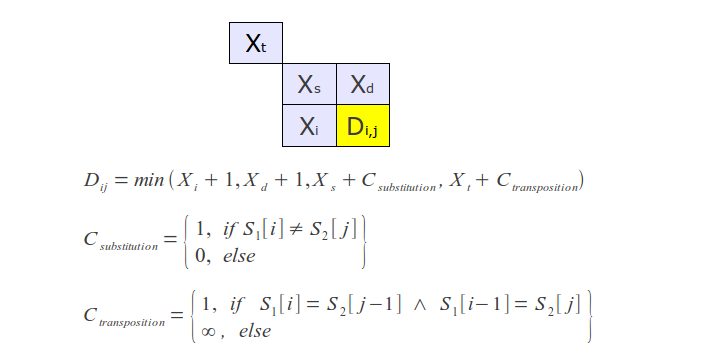
Where each slot D(i,j) is calculated using the following formula:

There are two things to tweak in order to use this distance with a trie.

Incremental computation

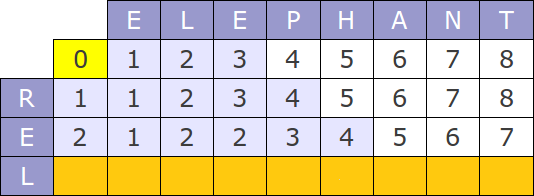
Obviously, we are not going to recompute the whole distance for each node. We can use one table for the whole search. For each node you explore, you are going to compute only the line corresponding to it's depth in the tree. For example, if you look for elephant and are currently at rel in the tree, you are only going to compute the 3rd row. The first two rows r and e are correct.

When to stop?

Now we need to find given a current table, when to stop. For example, if we search for elephant with 1 error and we are at zz, we can stop, there won't be any word that satisfy the request. I've found out that if the minimum value of the current row is bigger than the number of tolerated errors, we can stop the search. When searching for elephant with 1 error, we stop at the 4th row (rele) because the minimum is 2.

Heuristics

When we traverse the trie in a fuzzy way, we explore a lot of useless nodes. For example, when we fuzzy search for eve, we are going to explore the beginning of the word evening. Let's see some strategies to reduce the amount of nodes we explore.

Different trie per word length

Fuzzy search for the 5-letter word like happy with 1 error, you know that your results are going to be words of length 4, 5 or 6. In a generalized way, you are only going to look for words in the range [len - error; len + error]. You can create a trie for each length. Then you search in all the required tries and aggregate the results.

The downside with this approach is that you lose the high prefix compression of the trie.

Word length

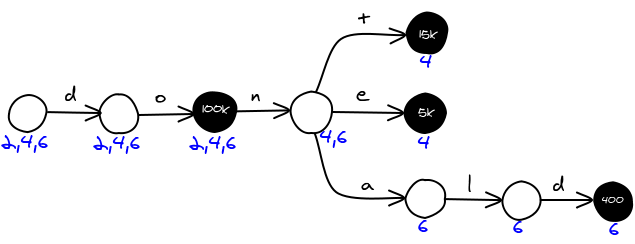
Instead of making on trie per word length, you can encode the word lengths directly in the nodes. Each node is going to have a bitfield containing the lengths of the words in the sub-tree. For example in the example above, the first node leads to words of size 2, 4 and 6, therefore the field will have 0b010101....

If you are looking for a word of size 5 with 1 error, you are going to create a bitfield of word lengths you are interested in 0b000111.... For each node, you and both bitfields, if the result is not 0, then you've got a potential match.

Conclusion

In order to test for performance we search every word at a distance 2 of the 400 most popular english words. The dictionnary contains 3 millions words. It takes 22 seconds on my old 2Ghz server to run it. It takes an average of 55ms per fuzzy search and generates an average of 247 results.

Felix Abecassis, a friend of mine spent time working on parallelizing the search with Intel TBB. You might want to read it in order to improve by a factor your performance ๐Ÿ™‚

Since it's a competitive school project, I'm not going to give the source publicly. Please ask them if you are interested ๐Ÿ™‚

Diablofans.com needed a bit of love. It is really gratifying to be able to visually improve a website by an order of magnitude just by changing some colors and fixing broken layout ๐Ÿ™‚

Here are some of the changes I made:

Post

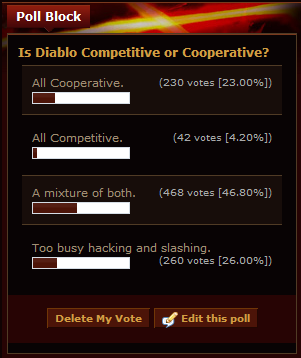
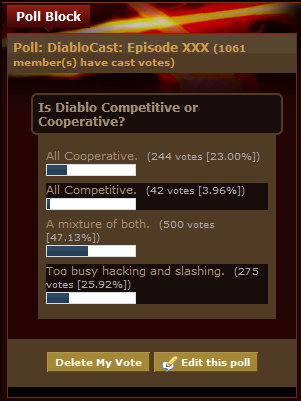
Poll

Blizzquote