Writing a parser for a structured binary format such as a 3D model is extremely annoying. You have first to declare your file structure, and then go over every structure again and make a proper code to parse it. This is mainly caused because the lack of introspection of C/C++ and for performance reasons.
In Javascript, it does not have to be that way! jParser is a class that only asks you to write a JSON version of the structure. It will parse the file automatically for you.
Here is an example of what you could write with jParser:
var description = {
  header: {
    magic: ['string', 4],
    version: 'uint32'
  },
  model: {
    header: 'header'
  }
};

var model = new jParser(file, description).parse('model');
console.log(model);
// {
//   header: {
//     magic: 'MD20',
//     version: 272
//   }
// } |
var description = {
header: {
magic: ['string', 4],
version: 'uint32'
},
model: {
header: 'header'
}
};
var model = new jParser(file, description).parse('model');
console.log(model);
// {
// header: {
// magic: 'MD20',
// version: 272
// }
// }
Description
Standard Structure
The description object defines blocks that needs to be parsed. In the previous example, we define two blocks header and model where each block is a list of labelled sub-blocks.
Default blocks such as int32, char, double are provided by jDataView.
This organization makes it easy to reproduce C structures. Let's see the description of the BMP format.
// Javascript Description
header: {
  header_sz: 	'uint32',
  width: 	'int32',
  height: 	'int32',
  nplanes: 	'uint16',
  bitspp: 	'uint16',
  compress_type:'uint32',
  bmp_bytesz: 	'uint32',
  hres: 	'int32',
  vres: 	'int32',
  ncolors: 	'uint32',
  nimpcolors: 	'uint32'
} |
// Javascript Description
header: {
header_sz: 'uint32',
width: 'int32',
height: 'int32',
nplanes: 'uint16',
bitspp: 'uint16',
compress_type:'uint32',
bmp_bytesz: 'uint32',
hres: 'int32',
vres: 'int32',
ncolors: 'uint32',
nimpcolors: 'uint32'
} |
// C Structure
typedef struct {
  uint32_t header_sz;
  int32_t  width;
  int32_t  height;
  uint16_t nplanes;
  uint16_t bitspp;
  uint32_t compress_type;
  uint32_t bmp_bytesz;
  int32_t  hres;
  int32_t  vres;
  uint32_t ncolors;
  uint32_t nimpcolors;
} BITMAPINFOHEADER; |
// C Structure
typedef struct {
uint32_t header_sz;
int32_t width;
int32_t height;
uint16_t nplanes;
uint16_t bitspp;
uint32_t compress_type;
uint32_t bmp_bytesz;
int32_t hres;
int32_t vres;
uint32_t ncolors;
uint32_t nimpcolors;
} BITMAPINFOHEADER; |
Reference Structures
As you already noticed, instead of using basic blocks, we can use our own blocks. In the following example, uvAnimation uses animationBlock that uses nofs:
nofs: {
  count: 'uint32',
  offset: 'uint32'
},

animationBlock: {
  interpolationType: 'uint16',
  globalSequenceID: 'int16',
  timestamps: 'nofs',
  keyFrame: 'nofs'
},

uvAnimation: {
  translation: 'animationBlock',
  rotation: 'animationBlock',
  scaling: 'animationBlock'
} |
nofs: {
count: 'uint32',
offset: 'uint32'
},
animationBlock: {
interpolationType: 'uint16',
globalSequenceID: 'int16',
timestamps: 'nofs',
keyFrame: 'nofs'
},
uvAnimation: {
translation: 'animationBlock',
rotation: 'animationBlock',
scaling: 'animationBlock'
}
Functions
At this point, it is possible to express any C structure and parse files that could be loaded using a simple read. We now need to integrate a logic within our parser using anonymous functions.
Recursive Parsing
It is a common operation to read consecutive blocks. It is possible to make an array block that takes a block name and a count. It parses all theses blocks and aggregates them into a Javascript array.
array: function (type, length) {
  var array = [];
  for (var i = 0; i < length; ++i) {
    array.push(this.parse(type));
  }
  return array;
}, |
array: function (type, length) {
var array = [];
for (var i = 0; i < length; ++i) {
array.push(this.parse(type));
}
return array;
},
In order to call a function, we use an array literal where the first element is the block name and the rest are the arguments. We can easily define float[234].
float2: ['array', 'float', 2],
float3: ['array', 'float', 3],
float4: ['array', 'float', 4] |
float2: ['array', 'float', 2],
float3: ['array', 'float', 3],
float4: ['array', 'float', 4]
We can use the array block to build a string block. We parse an array of char and join it.
string: function (length) {
  return this.parse(['array', 'char', length]).join('');
},

filename: ['string', 32] |
string: function (length) {
return this.parse(['array', 'char', length]).join('');
},
filename: ['string', 32]
Seek & Tell
In the World of Warcraft models, there is a small structure called nofs that tells us "There are [count] consecutive [type] at [offset]". We build a struct block in order to parse this pattern. It will use seek and tell to navigate through the file.
nofs: {
  count: 'uint32',
  offset: 'uint32'
},

struct: function (type) {
  // Read the count & offset
  var nofs = this.parse('nofs');

  // Save the current offset & Seek to the new one
  var pos = this.tell();
  this.seek(nofs.offset);

  // Read the array
  var result = this.parse(['array', type, nofs.count]);

  // Seek back & Return the result
  this.seek(pos);
  return result;
},

triangles: ['struct', 'uint16'],
properties: ['struct', 'boneIndices'] |
nofs: {
count: 'uint32',
offset: 'uint32'
},
struct: function (type) {
// Read the count & offset
var nofs = this.parse('nofs');
// Save the current offset & Seek to the new one
var pos = this.tell();
this.seek(nofs.offset);
// Read the array
var result = this.parse(['array', type, nofs.count]);
// Seek back & Return the result
this.seek(pos);
return result;
},
triangles: ['struct', 'uint16'],
properties: ['struct', 'boneIndices']
Code
The code that powers this is only 30 lines long (70 including the standard integral types). It just handles each possible data type.
parse: function (description, param) {
  var type = typeof description;

  // Function
  if (type === 'function') {
    return description.apply(this, [this.param].concat(param));
  }

  // Shortcut: 'string' == ['string']
  if (type === 'string') {
    description = [description];
  }

  // Array: Function Call
  if (description instanceof Array) {
    return this.parse(this.description[description[0]], description.slice(1));
  }

  // Object: Structure
  if (type === 'object') {
    var output = {};
    for (var key in description) {
      if (description.hasOwnProperty(key)) {
        output[key] = this.parse(description[key]);
      }
    }
    return output;
  }

  throw new Error('Unknown description type ' + description);
} |
parse: function (description, param) {
var type = typeof description;
// Function
if (type === 'function') {
return description.apply(this, [this.param].concat(param));
}
// Shortcut: 'string' == ['string']
if (type === 'string') {
description = [description];
}
// Array: Function Call
if (description instanceof Array) {
return this.parse(this.description[description[0]], description.slice(1));
}
// Object: Structure
if (type === 'object') {
var output = {};
for (var key in description) {
if (description.hasOwnProperty(key)) {
output[key] = this.parse(description[key]);
}
}
return output;
}
throw new Error('Unknown description type ' + description);
}
Conclusion
This little parser is an example of how to extensively use all the dynamic characteristics of Javascript such as Object Literals, Anonymous Functions and Dynamic Typing in order to build a powerful and easy to use tool.
I don't want to release the library just yet as I need to explore more use cases and find elegant solution for them too. But I hope it will give you inspiration to use full Javascript power.
Demo
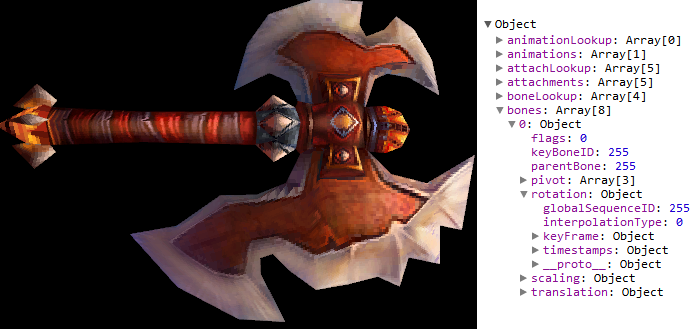
You can see it in action in my 0.1% completed Javascript WoW Model Viewer demo. The two following files are important:
 dice gives you some random formula. Also, on the left, you have all the evaluations that satisfy your formula.