Intercept and alter include

For a project, I want to transparently be able to intercept all the included javascript files, edit the AST and eval it. This way I can manipulate all the code of an application just by inserting a custom script.

  1. Hook the <script> tag insertion.
  2. Download the Javascript file using XHR.
  3. Parse, transform and eval the AST.

Hook the <script> tag insertion

There is a DOM event called DOMNodeInserted. However it has two major drawbacks:

  1. It does not work with the nodes written directly in HTML.
  2. It does not work with <script> tags.

Given those constraints, we cannot intercept <script> tag written in HTML. However hope is not lost for dynamically included scripts.

Dynamic Script Include

There are libs like headjs that let you include your javascript files within Javascript. They all work the same way: create a <script> tag using document.createElement, set the type, src and onload and finally insert it in the DOM. The following snippet is a basic implementation:

function include(url, callback) {
  var script = document.createElement('script');
  script.type = 'text/javascript';
  script.src = url;
  script.onload = callback;
  document.getElementsByTagName('head')[0].appendChild(script);
}

Hook script creation

Using this include technique, we satisfy the dynamic property (A). In order to workaround the (B), we need to rename the <script> tag into something else, for example <custom:script>. This is done by hooking document.createElement.

var createElement = document.createElement;
document.createElement = function (tag) {
  if (tag === 'script') {
    tag = 'custom:script';
  }
  return createElement.call(document, tag);
};
 
document.addEventListener('DOMNodeInserted', function (event) {
  var el = event.target;
  if (el.nodeName !== 'CUSTOM:SCRIPT') {
    return;
  }

document.addEventListener(‘DOMNodeInserted’, function (event) {
var el = event.target;
if (el.nodeName !== ‘CUSTOM:SCRIPT’) {
return;
}

Do our stuff

The hardest part messy part is done, now we can get to work on our implementation:

Download the file

Let’s download the file using a XHR request:

  var request = new XMLHttpRequest();
  request.open('GET', el.src, false);
  request.send(null);

The implementation is really basic, for a real implementation we should do something more sophisticated:

Transform the AST

In order to parse and transform the AST, I’m using the Reflect.js library. It has the advantage of containing a standalone javascript file that doesn’t require NPM dependencies.

Note: I’m using window.eval in order to eval from the global scope.

  var ast = Reflect.parse(request.responseText);
  var ast = transform(ast)
  window.eval(Reflect.stringify(ast));

Fire DOM Load event

If you want your dynamic include library to work, you need to fire the load event and set the appropriate readyState value.

  // Fire DOM Loaded event
  el.readyState = 'loaded';
  el.onload();
});

Conclusion

This technique does not work with HTML <script> tags (both with src and with inline code). It is really sad since the majority of scripts are included this way. However, we found a way to make it work on dynamic script injection. It is better than nothing.

The technique also have a big drawback, it will make debugging a lot harder as both filename and line number are lost with the eval call.

Use Cases

I think that the technique is not completely useless. Here are some thoughts:

  • Better GreaseMonkey: Alter the code of a website you don’t control.
    • Remove Closure. People often use closure to prevent people from accessing the code from the console. We could remove it.
    • Code injection: You may want to add some code like a console.log, making an additional check or setting up a hook on code you don’t own.
  • Code Analysis: Instrument the code to extract data.
    • Code Coverage. It is useful to see if your tests pass through all the branches.
    • Dead-Code Removal. If you run the application, you can see what parts of the code you used and remove those that were not used. It will help an additional pass with an optimizer such as Google Closure Compiler.
    • Profile-Guided Optimization. It is often used to do branch prediction or type analysis.
Copy SQL Row Changing ID

I’ve come across an SQL issue. I need to make a fake spell for the WoW database. However creating one from scratch is too annoying, there are like 30 non-NULL values to fill. Instead what I want is to copy an existing spell with the new id. It appeared to be less trivial than expected.

Working Solution

Let’s say you want to copy the spell #1000 into the spell #12345. Here is the SQL command to do it:

INSERT INTO spell
  SELECT 12345 AS id, name, icon, /* ... fill all the column names */
  FROM spell
  WHERE id = 10000;

Trying to improve …

It is really annoying to get the list of column names (You can get it using d spell). What we would like to do is use the wildcard * like this:

-- This is not working!
INSERT INTO spell
  SELECT *, 12345 AS id
  FROM spell
  WHERE id = 10000;

The problem is that * also adds a column named id. Therefore there are two id columns … Problem, now it no longer fits the spell structure.

What I need to make it work is to be able to remove a column from *. Here is something I’d like to write:

-- This is not working!
INSERT INTO spell
  SELECT *  id, 12345 AS id
  FROM spell
  WHERE id = 10000;

I tried to simulate with JOIN, UNION but I couldn’t get anything that works. If you have any idea, I’m really interested in!

Find HTMLEntity for any Character

I’ve always be annoyed when I want to use a character such as » in HTML as I struggle to find the corresponding HTML Entity. This is why I made this small utility. Just paste the sexy UTF-8 character you found and it will give you the associated HTML-ready code 🙂

Enter any weird character:

#utf8 {
text-align: center;
}
#utf8 table {
margin: 0 auto;
}
#utf8 th, #utf8 td {
padding: 3px;
}
#utf8 th {
text-align: right;
}
#utf8-output {
margin-top: 5px;
}
#utf8 .raw td, #utf8-input {
font-size: 25px;
}
#utf8-input {
width: 150px;
}

Javascript Presentation

The talk is over. Check out the Slides & Video.

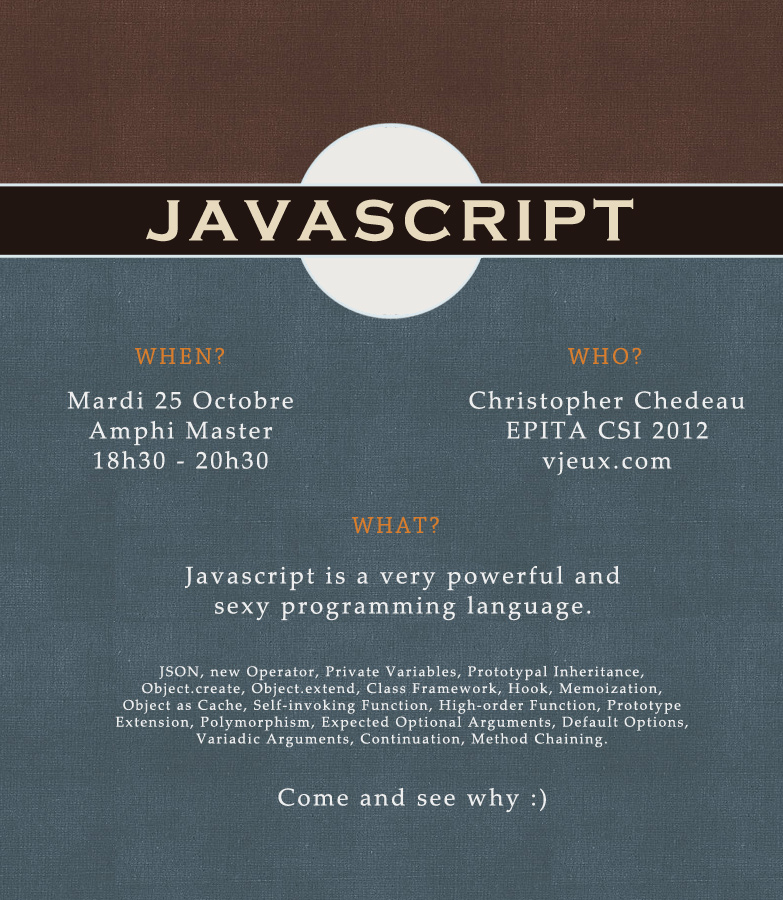
For several months now I’ve been surveying my friends and teachers at EPITA and I came to the conclusion that they have absolutly no idea what Javascript really is. In order to help them discover a language that is getting a lot of traction nowadays, I’m organizing a 2-hour presentation on the subject.

If you know how to program and are interested in learning sexy advanced Javascript, you are more than welcome to attend this presentation. It will be Tuesday 25th October from 6:30pm to 8:30pm at EPITA Amphi Master (Metro Porte d’Italie). If you are in Paris at this time and speak French, do not hesitate to send me a mail at [email protected], I will explain how to get there 🙂

I’ve written a more lengthy explanation about my motives and presentation’s content in the LRDE bulletin L’air de rien #23:

Edito par Olivier Ricou (Enseignant-Chercheur)

[…] Ce numéro est aussi l’occasion de mettre en valeur un étudiant du LRDE un peu fou, il aime Javascript, mais fort sympathique et qui sait partager sa passion. Il le fait à travers un article ici, mais aussi le mardi 25 octobre à 18h40 dans l’amphi masters (entrée libre). […]

Présentation Javascript

Les sites tels que Gmail, Facebook et Google Maps sont des exemples classiques d’utilisation de Javascript. Mais saviez-vous que l’interface de Windows 8 ou les extensions de Chrome et Firefox sont écrites en Javascript? Ou qu’il est possible d’écrire des serveurs web en Javascript grâce à Node.js ?

Javascript est partout et pourtant, je me suis rendu compte en parlant autour de moi que personne ne connaissait réellement ce langage. C’est pourquoi je vous invite à une présentation de deux heures sur le sujet le Mardi 25 Octobre en Amphi Master de 18h40 à 20h40.

Javascript, le language

Pour commencer, un petit peu d’histoire. Brendan Eich raconte qu’il a pensé et implémenté le premier prototype de Javascript en 10 jours en 1995. En effet, Javascript est un langage qui contient un nombre extrêmement restreint de concepts. Cette idée provient du monde des langages fonctionnels tels que Lisp, Haskell ou Caml. Le génie de Javascript c’est d’avoir su s’écarter d’un modèle mathématique parfait au profit d’un confort d’utilisation pour le développeur.

Javascript a pour objectif d’être utilisé par le plus grand nombre de personnes. La syntaxe du langage a été fortement inspirée du C et ne contient aucune fantaisie. Cela rend le code source lisible et compréhensible par n’importe quel informaticien. Le language a été conçu pour exécuter un maximum de programmes, même mal formés. Par exemple, une heuristique va rajouter des point-virgules manquant. Au final, la barrière d’entrée au Javascript est très faible.

Lambda Fonctions et Objects

Javascript tire sa puissance de deux concepts fondamentaux: les Lambda fonctions et les Objets. La présentation a pour objectif principal de vous apprendre à manipuler ces deux outils. En guise d’introduction au langage, je montrerais comment reproduire des paradigmes de programmation connus, en particulier la Programmation Orientée Objet.

Le navigateur est un environnement hostile. Dans un site cohabitent une multitude de modules Javascript développés par des personnes différentes. On peut citer le site lui-même, les publicités, les commentaires, les statistiques, le bouton “like”, etc. Nous verrons brièvement l’utilité des objets et des fonctions pour se placer dans l’un des trois points de vue suivant : être un citoyen respectueux, fortifier son code contre les attaquants ou au contraire s’amuser avec le code des autres.

Un langage dynamique

A l’école nous avons principalement étudié des langages de programmation statiques comme le C, C++ et Caml. Javascript quant à lui fait parti de la catégorie des langages dynamiques comme le PHP, Ruby ou Python. Les fonctionnalités de ces derniers ont pour objectif de simplifier la vie du développeur en s’éloignant des contraintes de la machine ou des théories mathématiques de typage. De ce fait, les langages dynamiques sont de plus en plus utilisés.

Nous étudierons les changements apportés par cette nouvelle façon de penser. Par exemple, les chaînes de caractères sont utilisées de façon quasi systématique afin de faciliter le débuggage, les objets sont construits à la volée dans définir leur structure dans un fichier séparé pour gagner du temps, etc.

Qui suis-je ?

Cette présentation n’est pas le fruit du hasard. Je me suis longuement intéressé à Javascript et aux langages dynamiques durant ces dernières années.

Le traitement d’image est largement developpé en utilisant des langages statiques en raison de l’important besoin en performance. Mon sujet de recherche au LRDE est d’adapter des concepts dynamiques tels que les lambda fonctions ou chaînage de méthode aux problématiques de traitement d’image

Je travaille en parallèle des cours pour la société Curse qui réalise des sites internet pour les joueurs de jeux en ligne dont World of Warcraft. J’utilise au quotidien Javascript, Python et PHP. Mes découvertes sont mises en ligne sur un blog : http://vjeux.com/.

À Épita, j’ai pu utiliser un langage de programmation dynamique dès ma première année. Lua est intégré dans Fooo, un remake de Warcraft III, afin de permettre des interfaces de jeu facilement personnalisables.

Javascript Object Difference

This article is about a difference algorithm. It extracts changes from one version of an object to another. It helps storing a smaller amount of information.

Template

In a project, I have a template object with all the default settings for a widget.

var template = {
    achievement: {
        page: 0,
        column: "name",
        ascending: true,
        search: "",
        filter: [1, 2, 3]
    }
};

Alter it

Default settings are changed during the use of the application. It can happen when you load a configuration from an object:

var override = {
    achievement: {
        page: 1,
        ascending: false
    }
};
var settings = _.extend({}, template, override);

Or when the user clicks on the buttons, you have script that edits a copy of the template:

var settings = _.extend({}, template);
settings.achievement.page = 1;
settings.achievement.ascending = false;

Find the differences

Now, we’d like to store the current user configuration. We could simply dump the current settings variable but we can do better. Instead we want to dump only what has changed from the defaults. This has the benefit of being smaller to store and more resilient to changes.

In order to extract changes between the template and settings, I made a small function called difference (If you have a better name, feel free to suggest :)).

var override = difference(template, settings);
console.log(override);
 
// Result:
{
    achievement: {
        page: 1,
        ascending: false
    }
}

// Result:
{
achievement: {
page: 1,
ascending: false
}
}

Instead of saving the full object, we only have to save 2 fields. This is therefore smaller 🙂 In order to get the full configuration back, we simply extend the template object with the difference:

var settings = _.extend({}, template, override);

In a way, difference is the opposite of extend.

  • settings = extend(template, override)
  • override = difference(template, settings)

How it works

Once we know what we want it to do, it is fairly straightforward to write. We traverse the template and build a new object that contains only attributes that mismatch between template and override. The following implementation makes great use of underscore (isObject, isArray and isEqual).

function difference(template, override) {
    var ret = {};
    for (var name in template) {
        if (name in override) {
            if (_.isObject(override[name]) && !_.isArray(override[name])) {
                var diff = difference(template[name], override[name]);
                if (!_.isEmpty(diff)) {
                    ret[name] = diff;
                }
            } else if (!_.isEqual(template[name], override[name])) {
                ret[name] = override[name];
            }
        }
    }
    return ret;
}

Note: Any attribute that is present only in the override object will be ignored.

Conclusion

I’m still looking forward storing as much information as possible in the hash part of the URL. Two years ago, I did SmallHash to encode integer ranges. This week, with URLON and this difference algorithm, I explored another way to look at the problem, dealing with structured objects.

It is possible to combine both approaches in order to encode structured objects that also contain integer ranges. Maybe in a next blog post!

Javascript: Cyclic Object Detection

URLON.stringify() suffer from a problem, when passed an object that contains a cycle, it will never stop. This article shows 3 techniques in order to detect if an object is cyclical.

Edit the object: Mark

In order to detect a cycle in an object, the method we learn at school is to mark each visited node. When doing a traversal, if we encounter an already marked node, then it is cyclic.

This method alters an object we don’t own. It is a dangerous practice and has many side effects.

  • How do we find a unique mark key? I chose to use Math.random but it has a slight chance of giving the wrong result and removing this key from the object!
  • Adding a new key then deleting it makes the object memory size change. Therefore there are great chances of introducing memory copy and at the end of the process, memory holes because of the attribute deletion.
  • It does not work with Sealed objects and Proxies.
function isCyclic (obj) {
  var seenObjects = [];
  var mark = String(Math.random());
 
  function detect (obj) {
    if (typeof obj === 'object') {
      if (mark in obj) {
        return false;
      }
      obj[mark] = true;
      seenObjects.push(obj);
      for (var key in obj) {
        if (obj.hasOwnProperty(key) && !detect(obj[key])) {
          return false;
        }
      }
    }
    return true;
  }
 
  var result = detect(obj);
 
  for (var i = 0; i < seenObjects.length; ++i) {
    delete seenObjects[i][mark];
  }
 
  return result;
}

function detect (obj) {
if (typeof obj === ‘object’) {
if (mark in obj) {
return false;
}
obj[mark] = true;
seenObjects.push(obj);
for (var key in obj) {
if (obj.hasOwnProperty(key) && !detect(obj[key])) {
return false;
}
}
}
return true;
}

var result = detect(obj);

for (var i = 0; i < seenObjects.length; ++i) {
delete seenObjects[i][mark];
}

return result;
}

Keep the mark in a separate data structure

Obviously, we want to avoid editing the object, but what solutions do we have? The only one I found is keeping the visited nodes in an array. Then using indexOf, we can detect if we already visited the node.

However, this is a O(n²) process where the previous one was O(n).

function isCyclic (obj) {
  var seenObjects = [];
 
  function detect (obj) {
    if (typeof obj === 'object') {
      if (seenObjects.indexOf(obj) !== -1) {
        return true;
      }
      seenObjects.push(obj);
      for (var key in obj) {
        if (obj.hasOwnProperty(key) && detect(obj[key])) {
          return true;
        }
      }
    }
    return false;
  }
 
  return detect(obj);
}

function detect (obj) {
if (typeof obj === ‘object’) {
if (seenObjects.indexOf(obj) !== -1) {
return true;
}
seenObjects.push(obj);
for (var key in obj) {
if (obj.hasOwnProperty(key) && detect(obj[key])) {
return true;
}
}
}
return false;
}

return detect(obj);
}

Use native JSON.stringify

The last technique is a bit hacky. When implemented by the browser, JSON.stringify will throw an error if the object happens to be cyclic. It requires a recent browser and feels wrong.

function isCyclic (obj) {
  var isNativeJSON = typeof JSON !== 'undefined' && JSON.stringify.toString().match(/{ [native code] }$/);
  if (!isNativeJSON) {
    throw 'Native JSON.stringify is not available, can't use this technique.';
  }
  try {
    JSON.stringify(obj);
    return true;
  } catch (e) {
    return false;
  }
}

Conclusion

The conclusion is a bit sad, none of the techniques above are satisfying. In order to make a pure-Javascript and efficient version of cycle detection, it would require an Object hash-map, which we don’t currently have.

If you are interested, the code source is on github and there’s a jsperf that compares the 3 techniques.

Related Work

If you need to store and load circular structures, use Douglas Crockford decycle & retrocycle functions.

URLON: URL Object Notation

#json, #urlon, #rison {
width: 100%;
font-size: 12px;
padding: 5px;
height: 18px;
color: #560061;
}

I am in the process of rewriting MMO-Champion Tables and I want a generic way to manage the hash part of the URL (#table__search_results_item=4%3A-slot). I no longer want to write a new parser every time I want to add a new widget.

Why JSON is not suited for URLs

JSON uses characters that are not widely known in the URL. For example, having the double quote character in the URL sucks for HTML embedding. As well, Many of the automated URL insertion will fail at highlighting the whole URL.

MSN Messenger trying to automatically URLify: See the missing last three }.

http://website.com/#{“table”:{“achievement”:{“column”:”instance”,”ascending”:true}}}

As a user, I am also really disturbed when I see this URL. This does not feel like a normal URL. I am a bit suspicious.

A strong requirement for an URL is its small size. JSON representation can be further compressed by removing extra quotes and ending characters such as " and }.

URLON

This is why I made URLON, a new Object Notation intended to be used in URLs. It makes use of URL friendly characters such as = : @ _ &. It is shorter than JSON and should no longer scare your users 🙂

Put some random JSON / URLON / Rison in one of the boxes to see the other notations update.

JSON:

URLON:

Rison:

$(‘#json’).keyup(function () {
try {
$(‘#urlon’).val(URLON.stringify(JSON.parse($(‘#json’).val())));
$(‘#rison’).val(rison.encode(JSON.parse($(‘#json’).val())));
} catch (e) {
$(‘#urlon, #rison’).val(‘Syntax Error: ‘ + e);
}
}).keyup();
$(‘#urlon’).keyup(function () {
try {
$(‘#json’).val(JSON.stringify(URLON.parse($(‘#urlon’).val())));
$(‘#rison’).val(rison.encode(URLON.parse($(‘#urlon’).val())));
} catch (e) {
$(‘#json, #rison’).val(‘Syntax Error: ‘ + e);
}
});
$(‘#rison’).keyup(function () {
try {
$(‘#json’).val(JSON.stringify(rison.decode($(‘#rison’).val())));
$(‘#urlon’).val(URLON.stringify(rison.decode($(‘#rison’).val())));
} catch (e) {
$(‘#json, #urlon’).val(‘Syntax Error: ‘ + e);
}
});

A reference implementation is available:

It is also available on NPM:

 npm install URLON
var URLON = require('URLON');
console.log(URLON.stringify({URLON: 'works'}));
// _URLON=works

JSON / URLON Comparison

Object

An object starts with an underscore _. All the fields are separated by ampersand & and terminated by a semicolon ;. It makes it feel really url’ish. Note that trailing semicolons can safely be removed.

  • JSON: {"first": "value", "second": "value"}
  • URLON: _first=value&second=value

String

A string just starts with an equal sign =. A string stop as soon as it reaches a reserved keyword (= : @ _ &). You can escape a character a slash before /.

  • JSON: "string"
  • URLON: =string

Number, Boolean and null

Sadly, we have to distinguish between Strings and Numbers/Booleans/null. Therefore I chose to use a colon : for those instead.

  • JSON: 123.42
  • URLON: :123.42
  • JSON: true
  • URLON: :true
  • JSON: null
  • URLON: :null

Array

An array starts with a arobas @ and elements are separated by comma @. The prefix typing does not really fit well with the Array syntax. If you can find something better, I’m open to your suggestions 🙂

  • JSON: [1, "vjeux", 3]
  • URLON: @:1@=vjeux@:3

URLON / Query String

Query String is a standard for encoding structured data in a URL context. It is implemented natively in PHP and Ruby. However, I strongly believe that URLON is better for several reasons:

  • Query String are not typed: Every atomic value is a string. This makes it less expressive than JSON and less easy to work with as numbers and booleans are common in urls.
  • Query Strings are big. For every leaf node, the whole identifier is being written, this is a waste of space.

The following example from the PHP Documentation compares JSON, Query String and URLON.

JSON

{
  "user": {
    "name": "Bob Smith",
    "age": 47,
    "sex": "M",
    "dob": "5-12-1956"
  },
  "pastimes": ["golf", "opera", "poker", "rap"],
  "children": {
    "bobby": {
      "age": 12,
      "sex": "M"
    },
    "sally": {
      "age": 8,
      "sex": "F"
    }
  }
}

Minified JSON

{"user":{"name":"Bob Smith","age":47,"sex":"M","dob":"5-12-1956"},"pastimes":
["golf","opera","poker","rap"],"children":{"bobby":{"age":12,"sex":"M"},
"sally":{"age":8,"sex":"F"}}}

Query String

user[name]=Bob+Smith&user[age]=47&user[sex]=M&user[dob]=5-12-1956&pastimes[0]=golf
&pastimes[1]=opera&pastimes[2]=poker&pastimes[3]=rap&children[bobby][age]=12
&children[bobby][sex]=M&children[sally][age]=8&children[sally][sex]=F

URLON

_user_name=Bob%20Smith&age:47&sex=M&dob=5-12-1956;&pastimes@=golf@=opera
@=poker@=rap;&children_bobby_age:12&sex=M;&sally_age:8&sex=F

Rison

(user:(name:'Bob Smith',age:47,sex:M,dob:'5-12-1956'),pastimes:!(golf,opera
,poker,rap),children:(bobby:(age:12,sex:M),sally:(age:8,sex:F)))

Rison is a tiny-bit longer than URLON but is easier to read. However it does not feel like it’s part of an URL to me. It is also common for automatic linking to break on parenthesis ( or ), meaning that we are back with the same issues as JSON.

Please, feel free to give your ideas in the comments 🙂

WoW Interface Anchor Positioning

I’ve always found CSS positioning with both float and position: absolute/relative hard to work with. I want to introduce to you an alternative way borrowed from the World of Warcraft Interface: Anchors.

Anchor

The concept is extremely simple. You can tell where you want the element to be, relative to another. For example, top left of this blog’s main content is 10px right relative to the top right of the menu.

<frame name="Content">
  <anchor point="TOP LEFT" relativeTo="Menu" relativePoint="TOP RIGHT" x="10" />
</frame>
  • Allowed points:
       TOP LEFT ,  TOP   , TOP RIGHT
           LEFT , CENTER , RIGHT
    BOTTOM LEFT , BOTTOM , BOTTOM RIGHT
  • Default Values:
    • point, relativePoint: TOP LEFT.
    • relativeTo: Parent of the element.
    • x, y: 0.

Demo

I’ve made a quick implementation of this behavior in HTML using data-attribute. Check the Javascript tab to see the 35 lines of CoffeeScript that makes the following code work:

<!-- In order to put the sidebar centered at the right of the frame:
  Sidebar.left = Frame.right                                          -->
<div id="sidebar" data-anchor="left, #frame, right"></div>
 
<!-- In order to put the chat at the top right of the screen:
  Chat.topRight = HTML.topRight + {x: -10, y: 10}                       -->
<div id="chat" data-anchor="top right, html, top right, -10, 10"></div>

<!– In order to put the chat at the top right of the screen:
Chat.topRight = HTML.topRight + {x: -10, y: 10} –>
<div id="chat" data-anchor="top right, html, top right, -10, 10"></div>

Limitations

Static

The current code works well for static elements. As there isn’t any event for DOM move/resize, the position will not be updated if anything moves 🙁

It might be possible to achieve the same effect by setting properly the position: absolute/relative and top/bottom/right/left CSS properties. I’d be really interested to know if you try to tackle this challenge 🙂

CSS Attribute

It would be more semantically correct to add an anchor CSS attribute instead of an HTML data attribute. However, it’s not possible to access the value of a custom CSS property.

#sidebar {
  anchor: bottom left #frame top right 10px 0;
}

Multiple Anchors

World of Warcraft supports multiple anchors. For example if you anchor both the left and right sides, then the width of the element is going to be updated accordingly.

CSS – One Line Justify

I came across a CSS problem, text-align: justify does not work with only one line.

Justify behavior

The reason is because it has been designed with paragraphs in mind. It justifies all the lines but the last one.

Normal Justify

Lorem ipsum dolor sit amet, consectetur adipisicing elit, sed do eiusmod tempor incididunt ut labore et dolore magna aliqua. Ut enim ad minim veniam, quis nostrud exercitation ullamco laboris nisi ut aliquip ex ea commodo consequat laboris.

Full Justify

Lorem ipsum dolor sit amet, consectetur adipisicing elit, sed do eiusmod tempor incididunt ut labore et dolore magna aliqua. Ut enim ad minim veniam, quis nostrud exercitation ullamco laboris nisi ut aliquip ex ea commodo consequat laboris.

.oneline {
text-align: justify;
}
.oneline:after
{
content:””;
display:inline-block;
width:100%;
}

Solution

The solution (given by cam) is to put an extra tag at the end of the paragraph that will be big enough to create a new line. Fortunately, it is possible to do it without affecting the markup using :after. We are going to put an empty tag as big as the line.

.fulljustify {
  text-align: justify;
}
.fulljustify:after {
  content: "";
  display: inline-block;
  width: 100%;
}

Now you can add class="fulljustify" in order to justify your one-line divs 🙂

This is a one-liner. Please justify!

World of Warcraft HTML Tooltip Diff

MMO-Champion is a World of Warcraft news website. When a new patch is released, we want to show what has changed in the game (Post Example). An english summary of each spell change is hand written, but we want to show the exact tooltip changes.

.sigrie-tooltip {
max-width: 325px !important;
float: none;
display: inline-block;
}
.inline ins { background-color: #afa; }
.inline del { background-color: #faa; }
ins, del {
text-decoration: none;
}
.new ins {
background-color: #afa;
}
.old ins {
background-color: #faa;
}
.sigrie-tooltip ins {
color: black;
background-color: #80FF80;
font-weight: bold;
}

Generate Tooltips

First, we use the database application to generate the tooltips in HTML form.

Epic
Binds when equipped
Chest
1669 Armor
+341 Intellect
+512 Stamina
Requires Level 85
Item Level 359
Equip: Improves critical strike rating by 205.
Equip: Increases your mastery rating by 241.
Epic
Binds when equipped
Chest
1669 Armor
+321 Intellect
+512 Stamina
Requires Level 85
Item Level 359
Equip: Improves critical strike rating by 205.
Equip: Increases your mastery rating by 221.

Tokenize

We are not going to do a full HTML diff which is really difficult. Instead, the trick is to parse the HTML and extract only text nodes. We split them by space to generate a token stream.

.html-diff-bulle span { display: inline-block; border: 1px solid #333; border-radius: 3px; margin: 3px; padding: 2px; }
.html-diff-bulle .old { background-color: #faa; }
.html-diff-bulle .new { background-color: #afa; }

ChestguardofNature’sFuryBindswhenequippedChest1669Armor+341Intellect+512StaminaRequiresLevel85Equip:Improvescriticalstrikeratingby205.Equip:Increasesyourmasteryratingby241. ChestguardofNature’sFuryBindswhenequippedChest1669Armor+321Intellect+512StaminaRedSocketSocketBonus:+10HasteRatingRequiresLevel85Equip:Improvescriticalstrikeratingby205.Equip:Increasesyourmasteryratingby221.

Diff

Paul Butler SimpleDiff algorithm is used on the two token streams to label each token with old, new or both.

ChestguardofNature’sFuryBindswhenequippedChest1669Armor+341Intellect+512StaminaRequiresLevel85Equip:Improvescriticalstrikeratingby205.Equip:Increasesyourmasteryratingby241. ChestguardofNature’sFuryBindswhenequippedChest1669Armor+321Intellect+512StaminaRedSocketSocketBonus:+10HasteRatingRequiresLevel85Equip:Improvescriticalstrikeratingby205.Equip:Increasesyourmasteryratingby221.

Combine

We parse the HTML again. This time we pretty-print the HTML while traversing it. As we parse text nodes, we add <ins> tags where we need to. We just make sure to group contiguous insertions.

Epic
Binds when equipped
Chest
1669 Armor
+341 Intellect
+512 Stamina
Requires Level 85
Item Level 359
Equip: Improves critical strike rating by 205.
Equip: Increases your mastery rating by 241.
Epic
Binds when equipped
Chest
1669 Armor
+321 Intellect
+512 Stamina
Requires Level 85
Item Level 359
Equip: Improves critical strike rating by 205.
Equip: Increases your mastery rating by 221.

Text Diff

We would also like to get a text-based diff we can insert in a Patch Note. We combine both token streams into one.

Chestguard of Nature’s Fury
Binds when equipped
Chest
1669 Armor
+341+321 Intellect
+512 Stamina
Red Socket
Socket Bonus: +10 Haste Rating
Requires Level 85
Equip: Improves critical strike rating by 205.
Equip: Increases your mastery rating by 241.221.

Chestguard of Nature’s Fury Binds when equipped Chest 1669 Armor +341+321 Intellect +512 Stamina Red Socket Socket Bonus: +10 Haste Rating Requires Level 85 Equip: Improves critical strike rating by 205. Equip: Increases your mastery rating by 241.221.

However, the result isn’t that readable. There is too much noise. We want to show only the information that has changed! In order to do that, we are going to keep only the lines that contain changes.

+341+321 Intellect
Red Socket
Socket Bonus: +10 Haste Rating
Equip: Increases your mastery rating by 241.221.

+341+321 Intellect Red Socket Socket Bonus: +10 Haste Rating Equip: Increases your mastery rating by 241.221.

And it works a lot better 🙂

Conclusion

This approach is working really well with the World of Warcraft tooltips. After many patches and hundreds of changes, I haven’t seen any weird behavior. They were common before using this technique. The only downside: non textual changes such as icons or colors will be completly ignored.